Create a game: Difference between revisions
From FreeAllegiance Wiki
Jump to navigationJump to search
No edit summary |
m (→How Do I create a game?: Clearer picture and instructions) |
||
| Line 1: | Line 1: | ||
==How Do I create a game?== | ==How Do I create a game?== | ||
[[Image:Create game.PNG|thumb|right|How to create a game]] | |||
#In the server lobby click '''Create Game'''. This will open a new window | |||
#Type a game name. | |||
#*If you use the word "newb" anywhere in the name [[ASGS]] will consider it to be an [[newbie server|official newbie server]] and will [[ban]] anybody with a rank of 5 or higher. | |||
#Select which [[server]] you want the game to be hosted on. | |||
#*GPZ is in Europe, Planet is Texas, Stripe is Canada, and 3FL is Australia. Pick whichever is closest to you. | |||
#Select which [[core]] you want to play. | |||
#*The most commonly played core at the moment (February '09 that is) is CC_03. | |||
#Click '''Create game''' to launch. | |||
#*It will not appear until Step 3 and 4 are complete. | |||
{{clear}} | |||
==How do I make a single team?== | ==How do I make a single team?== | ||
Revision as of 01:00, 16 February 2009
How Do I create a game?

- In the server lobby click Create Game. This will open a new window
- Type a game name.
- If you use the word "newb" anywhere in the name ASGS will consider it to be an official newbie server and will ban anybody with a rank of 5 or higher.
- Select which server you want the game to be hosted on.
- GPZ is in Europe, Planet is Texas, Stripe is Canada, and 3FL is Australia. Pick whichever is closest to you.
- Select which core you want to play.
- The most commonly played core at the moment (February '09 that is) is CC_03.
- Click Create game to launch.
- It will not appear until Step 3 and 4 are complete.
How do I make a single team?
You can create a One Person server in order to learn a tech tree, fly different ships, or just goof off.

Note You can only do this in a game you create, not the permanently running games (i.e. the Newbie Servers)

- First you need to become the Game Controller - simply join a team if you're alone, or persuade the current Game Controller to pass control to you if you're not.
- Then simply uncheck the box next to the other team.

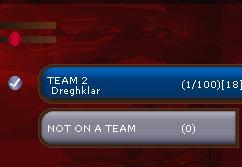


Note You can only uncheck teams which have no players on them
Four for Two
Another use for empty teams: If you're playing with someone else you might want to setup a Yellow vs Purple or a Blue vs Green match. This gives you "new" maps to play on, and also doubles the total amount of money on the map - you may want to reduce the total money setting to counter this.
Turn total teams to 4 and turn off the two you don't want played. Below you can see 3 maps and how they change when two more teams are added (Yellow and purple edited out for clarity):
Double Ring:

Big Ring:

Star:


