Code documentation
Allegiance Code Documentation
Overview
The key components of Allegiance are:
- The client - Allegiance.exe
- the server - AllSrv.exe and the UI tool AllSrvUI.exe
- the lobby - AllLobby.exe
In a typical configuration, there are many servers and clients which connect to a single lobby. A server can host many games at once and a client can join only one server and one game at a time. The lobby is the central communication place where servers announce themselves (and the games they're hosting) and where clients can find, join or create games on a choosen server.
These keys components share many lines of code with the use of common libraries. The most notable ones are the messsaging API library which is built on Microsoft DirectPlay and the IGC library which handles the game logic.


Stub This article is incomplete This is an article about a topic that should be covered in more detail by the FreeAllegiance Wiki, but is lacking in content.
You can help by improving it!

ZLib and Utility libraries
The ZLib library is a set of helper classes. It's used by all projects in the allegiance source. The most notable items of ZLib are:
- the ZString class which deal with strings.
- the TRef<T> template class which deal with object pointers and automatic garbage collection.
- some maths objects (vector, matrix,...)
- the Window class and win32 main entry point
The Utility library deals with more complex stuff than the ZLib library:
- the collision API which use Convex Hull
- the messaging API (network code) which is build on top of DirectPlay
- dynamic linked lists of pointers used widely in the several parts of the source.
IGC library
IGC stands for Internet Game Core. It's the game logic library (API) and it's shared between clients and servers.
IGC Interfaces & Objects
IGC is accessed with of a set of hierarchical abstract classes (interfaces) that hold all the game objects (ships, stations, sectors,...) and their current properties (position, speed, ...).The top interface is ImissionIGC which represents a game. ImissionIGC is implemented in the CmissionIGC class (src\Igc\missionigc.cpp). It holds lists of all other objets (ships,stations,...) and provides methods for accessing them. These lists are all implemented with template classes (Slist_utl<> and Slink_utl<> which can be found in the Utility library).
The most notable method of ImissionIGC is the the 'Update' member method. It is called every ticks on the server and it's propagated in the various IGC object lists and update their states according to the game logic.
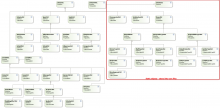
Class Diagram

When the game needs to create a new object, instead of instancing the object from scratch, the IGC library usually provides a 'template' for this object. The template holds several attributes that are used are initial values for the corresponding attributes of the new object. There can be many different templates for a given object type, the game must tell which template to use when creating an object. This how there can be different factions with different stations, ships and weapons. For example, the class representing active missiles is CmissileIGC, it uses the ImissileIGC interface and a new missile is initialized from a chosen CmissileTypeIGC (ImissileTypeIGC interface). Check the IGC classes diagram for the list of all IGC interfaces including the template ones.
All these templates are stored in static lists of IGC objects and since they are statics, they're not transmitted between the server and the clients but instead are stored into what we call a core file. So a server only tells a client the core file name the game uses and the client will load it from its local artwork folder instead of receiving it over the network.
IGC Callbacks
Since both server and client share the IGC code, there is the need for them to react differently when a change occurs. For instance, when a ship is destroyed, the client will need to draw the ship explosion while the server will not need to do this but instead it will propagate that event to the other clients (or at least to the clients which need to know about that explosion). So both client and server are 'consumers' of the IGC library.
Consumers of the IGC library must implement the IsiteIGC interface in order to be called upon game state changes. The server implements it in the FedSrvSiteBase class and the client in the BaseClient class. We can view the IsiteIGC interface as a set of event callback functions. Understanding how this works is the main step of understanding the whole IGC library. IsiteIGC is not the only callback set, there are others: the ThingSite interface which deals with objects having a model (mainly all IGC objects derived from TmodelIGC<T>) the ClusterSite intertace which deals with sectors. These allows to add callbacks on a per object scope instead of using only the global ones of IsiteIGC.
Client/Server communication & updates
Since both client and server share the same IGC code but react differently to it due to different callback implementations, only a subset of the game logic updates are done within the IGC library. The main entry for this is CmissionIGC::Update(...) which is called every tick on all clients and server (but each client has only a subset of the a game IGC objects whereas the server has everything). The remaining game logic updates are all handled by the server. This includes collisions, damages, object creations and some object deletions (some object deletions are processed inside IGC library and so are performed on all sides during the Update(...) without requiring network exchanges). Even if IGC is the game logic layer, a lot of game logic code isnt in it. So warning when doing changes to the game logic: they require careful inspection and knowledge in order to be performed, it's not all in the IGC library.
WinTrek - Allegiance Client
Allegiance.exe is the game client. It is build from many subprojects, the top one been src\WinTrek. The client (refered as WinTrek there after) consists of several layers on top or next of each others. The lower one is ClintLib which is the minimalist game client without any UI at all. It deals with everything needed to connect to lobby/servers and handle the game logic. WinTrek is the code that links ClintLib with 3 engines (gfx, effects and sound) and a training module in order to produce Allegiance.exe. These various components are explained here after.
ClintLib
The ClintLib name is presumed to be a shortcut for "Client Library". It's a library project that use IGC library and produces an interface less, minimalist game client that can fully communicate with game servers and the lobby. The main class of ClintLib is BaseClient from which any working allegiance game client need to inherit from. As of today, only 2 known executables are built on it: Allegiance.exe and the Pigs test system. ClintLib is totally independent of the "engines" layers. Its purpose is to isolate everything that is about game logic and network communication. It's definitely the starting foundation on which one could write a brand new client with a new gfx engine for instance.
Graphic engine
This is the graphical engine. It deals with .. TBC
Stub This article is incomplete This is an article about a topic that should be covered in more detail by the FreeAllegiance Wiki, but is lacking in content.
You can help by improving it!
Effect engine
The effect engine is built on top of the graphic engine... TBC
Stub This article is incomplete This is an article about a topic that should be covered in more detail by the FreeAllegiance Wiki, but is lacking in content.
You can help by improving it!
Sound engine
Stub This article is incomplete This is an article about a topic that should be covered in more detail by the FreeAllegiance Wiki, but is lacking in content.
You can help by improving it!
Training
Stub This article is incomplete This is an article about a topic that should be covered in more detail by the FreeAllegiance Wiki, but is lacking in content.
You can help by improving it!
FedSrv - Allegiance Game Server
AGC Library
AllSrvUI
Stub This article is incomplete This is an article about a topic that should be covered in more detail by the FreeAllegiance Wiki, but is lacking in content.
You can help by improving it!
Lobby - Allegiance Lobby Server
Stub This article is incomplete This is an article about a topic that should be covered in more detail by the FreeAllegiance Wiki, but is lacking in content.
You can help by improving it!
Tools
XMunge
XMunge is a build time tool aimed at manipulating DirectX .X files. XMunge uses Direct3D Retained Mode which has been abandoned due to low adoption. This tool definitely could use a complete rewrite.
Pigs
Pigs are a set of testing tools. The main purpose is to provide a way to simulate many allegiance clients by not using real game clients but instead automated 'bots' that behave according to various scripts. To do so, the Pigs use the same Clintlib library than the game client in order to fully behave like real clients (at least as seen from the server). This is handy to stress test the server and the IGC and networking APIs.
mdlc
MDLC is a build time tool aimed at performing some manipulations on MDL model files. For how to use see mdlc.
One important thing about MDLC is that its code use the same engine code (src\engine) than the allegiance client, so it is always in sync regarding what models the client can handle.

