Hello, my name is Bob and i'm a newbie.
...
Okay well my name is not Bob but i'm still a newbie.
To cut the chase, i did the training missions and it feel like i should have 3 or 4 hands to effectively reach all the bindings (and the mouse!), what keymap should i use?
Default with virtual joystick on ? off ? (I use mouse and keyboard.)
I tried remaping bindings but i feel that i'm not sure i'm heading the right way...
What do veteran use ?
Should i stick to default bindings ?
Thx.
Suggested Key Map ?
Turning virtual joystick on allows you to use the mouse to fly, which is the way to go. Usually people remap all the important in-flight keys (stuff that needs to be accessed immediately even during a dogfight, like sidethrusters and targeting keys) to one side of the keyboard, and scatter the more complex and less urgent stuff across the keyboard according to preference.

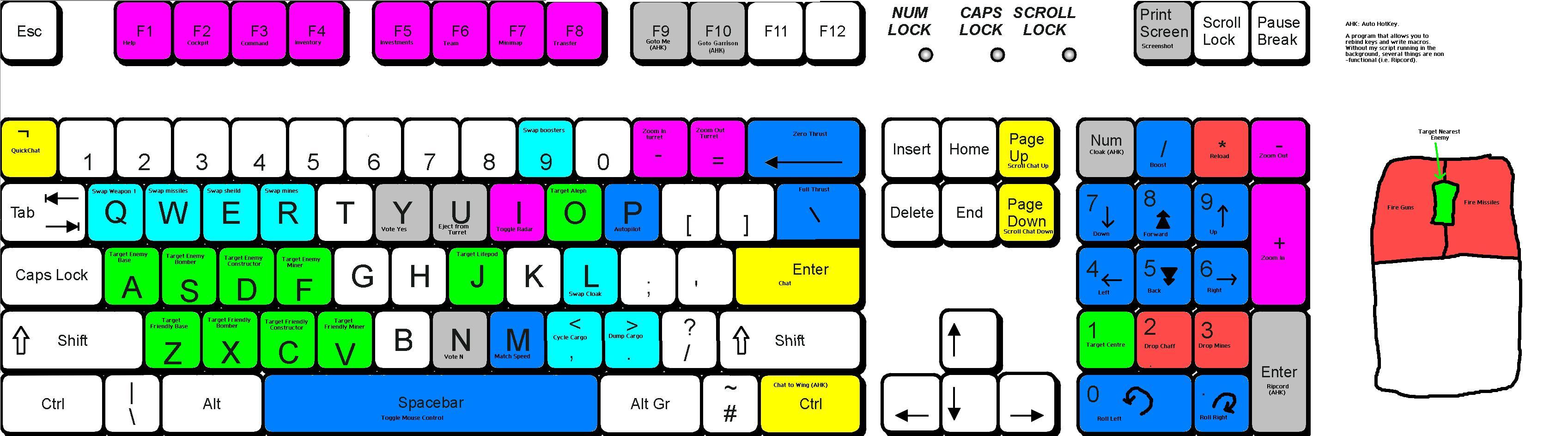
Is http://pk.dras.us/users/juckto/keyboardwords.JPG from juckto a good way to go ?
I only change WASD to side/up/down thrusts, q and r to roll and a fer different targeting keys. Experiment, but you should have your thrusters in a place thats good for you.
Last edited by Slice on Sun Mar 07, 2010 8:47 am, edited 1 time in total.
Winning isn't everything, but wanting to win is.
Keep Sport Free!
Keep Sport Free!
There are better pilots than me here, so I'll give you some situational awareness key tips.
Install CortUI.
Make sure the minimap is extended and disengage mouse flying often to look at what goes on in diff sectors.
Target center is critical.
Target hostile is critical (it selects whoever is shooting at you).
Flying backwards is not a luxury.
Bind keys to select friendly/enemy bombers/cons/miners. These will allow you to "survey" your sector much faster than switching to F3.
I use a combination of Alt/Ctrl with B,C and M for these.
Last but not least, don't be tempted to mess with the loadout keys.
I also strongly recommend installing improved chat packs.
TE's is a must IMHO.
Even better is Badp's TE variant, but I'm not objective because I love it so much.
Install CortUI.
Make sure the minimap is extended and disengage mouse flying often to look at what goes on in diff sectors.
Target center is critical.
Target hostile is critical (it selects whoever is shooting at you).
Flying backwards is not a luxury.
Bind keys to select friendly/enemy bombers/cons/miners. These will allow you to "survey" your sector much faster than switching to F3.
I use a combination of Alt/Ctrl with B,C and M for these.
Last but not least, don't be tempted to mess with the loadout keys.
I also strongly recommend installing improved chat packs.
TE's is a must IMHO.
Even better is Badp's TE variant, but I'm not objective because I love it so much.


-
One-Man-Bucket
- Posts: 1248
- Joined: Sun Jun 19, 2005 7:00 am
I've installed CortUi and the variant of TE's chatpack.Fever wrote:QUOTE (Fever @ Mar 7 2010, 05:07 AM) wth? need to play moar FPS!
everyone knows allegiance = quake in space!
I already had WASD for control and q and e for rolling, but i felt i was getting it over my head when i had to start remapping the target ennemy, hostile, nearest, etc.
I guess i'll mess around with the configs.
Thx
By the way, is there only 800x600 ? Everything in game look blured since i have a huge widescreen...