Posted: Tue Jun 23, 2009 7:38 am
Those of you that have paid attention to my InfoHud project will know the pending updates to my Hud for when R5 is released.
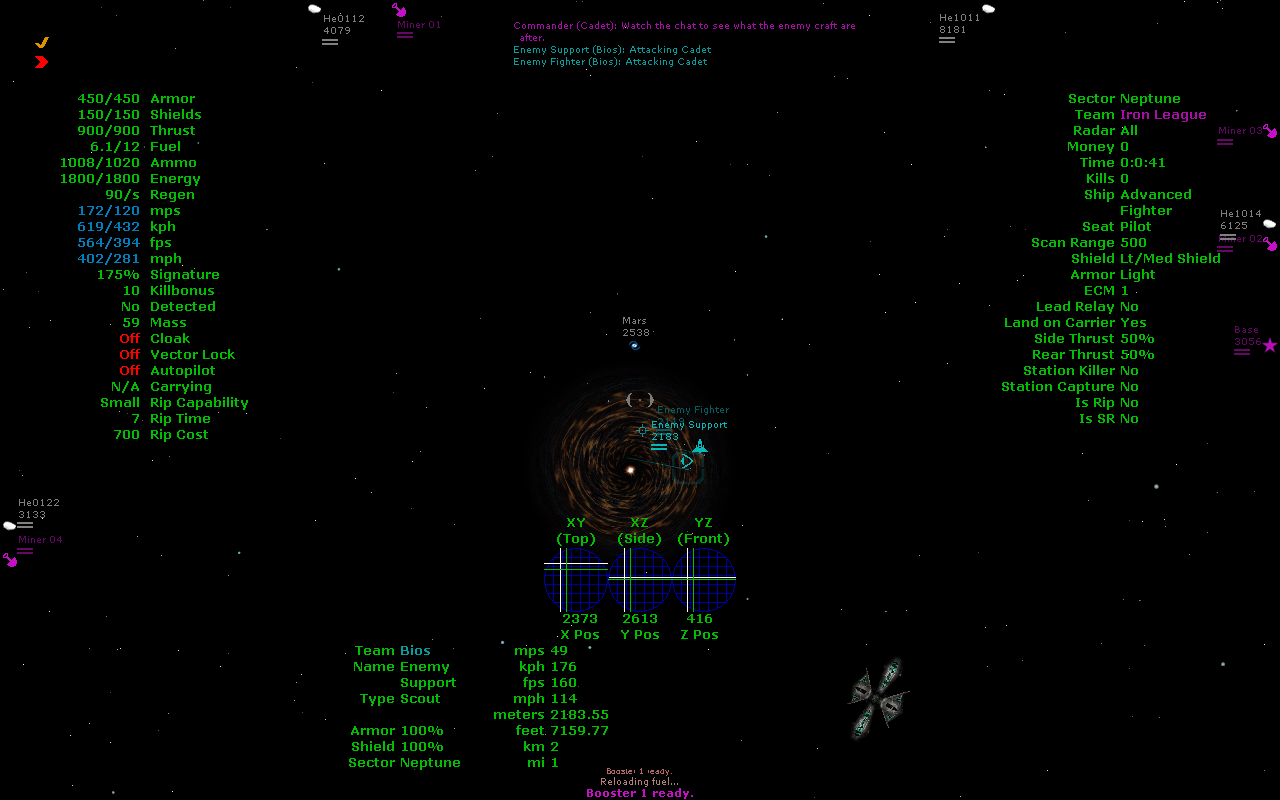
Now here's one more: A quasi-mini-F3/sector minimap. (Click for larger version)
What it shows: The player's position (Green lines) and the target's position (White lines), in relation to the sector grid. This is calibrated to the sector grid size (Which doesn't scale with the core sector size) of a 7500 meter radius. The position of the player/target are at the intersections of the lines. Of course, the target lines only appear when there is something targeted.
The grid on the far left is the sector grid viewed from top down. The center grid is if it was viewed from the left or right (From default F3 view) with a grid applied, and the grid on the far right is if it was viewed from the front or back (From default F3 view) with a grid applied.
It's still incomplete (As is the rest of InfoHud) - for I want to make the "white" line change to the target's team color (if applicable), and I want to re-do the whole grid (To make the lines not at random intervals)
The rest of InfoHud that I have yet to do:
Column 3 for the target - Things like XYZ positions, various ship tags (Basekiller, Base Capture, etc), and the like that are available to everyone.
I have to look over the code to see what can be done with what, as I THINK I put some things to "friendly only" mode, and if I did, they'll go in Column 4 instead of an image for friendly targets.
Now here's one more: A quasi-mini-F3/sector minimap. (Click for larger version)
What it shows: The player's position (Green lines) and the target's position (White lines), in relation to the sector grid. This is calibrated to the sector grid size (Which doesn't scale with the core sector size) of a 7500 meter radius. The position of the player/target are at the intersections of the lines. Of course, the target lines only appear when there is something targeted.
The grid on the far left is the sector grid viewed from top down. The center grid is if it was viewed from the left or right (From default F3 view) with a grid applied, and the grid on the far right is if it was viewed from the front or back (From default F3 view) with a grid applied.
It's still incomplete (As is the rest of InfoHud) - for I want to make the "white" line change to the target's team color (if applicable), and I want to re-do the whole grid (To make the lines not at random intervals)
The rest of InfoHud that I have yet to do:
Column 3 for the target - Things like XYZ positions, various ship tags (Basekiller, Base Capture, etc), and the like that are available to everyone.
I have to look over the code to see what can be done with what, as I THINK I put some things to "friendly only" mode, and if I did, they'll go in Column 4 instead of an image for friendly targets.

 I wished something like this would exist since I started playing the game, heh. Awesome. ^_^