Page 6 of 7
Posted: Thu Apr 10, 2008 10:16 pm
by Beez
i don't have the loop problem, but i have a different one
it keeps saying "unknown error occurred"
could someone help me on this plz?
Posted: Thu Apr 10, 2008 10:40 pm
by madpeople
Posted: Thu Apr 10, 2008 10:55 pm
by parcival
`yt Burnin_1! The trick worked for me too.
To make your life easier, backup the Allegiance Registry entries (File->Export... etc). Then make a copy of this reg file and modify it's values to the new ones (just use your editor's replace function; much easier than playing with regedit). Then import the newly created reg file.
Thus, when the bug is fixed you can easily revert to the normal registry settings by just importing the old settings back.
Posted: Fri Apr 11, 2008 12:20 am
by Burnin_1
Cortex wrote:QUOTE (Cortex @ Apr 10 2008, 12:59 PM) I might have missed something, but...
All .NET Frameworks (1.1, 2.0, 3.5) and all patches/updates installed.
ASGS installed after the .NET Frameworks -- failed. Now updated to ASGS Build 165 using the archive posted by Pooky.
Boot partition is C:, System partition is D:, Alleg is installed on E:
Works fine without any special modifications (i.e. in particular without the 'subst' solution suggested by Burnin).
I got an "OOBE Failed" in the statusbar after launching ASGS, but after giving username and password, I could connect without any further problems.
-- Cort
PS: Thanks for bringing me back, 39 days of inactivity and the second time in red ever since joining this fine community were refreshing, but frustrating as well. /smile.gif" style="vertical-align:middle" emoid=":)" border="0" alt="smile.gif" />
It worked because your "System Drive is C" I Know what MS calls them but they are always screwing with terminology, in this case they call the drive with your "system files" on it the "Boot partition" and vise versa. They like to confuse us like that. I don't know if Vista is that way but knowing MS it probably is.
Silly me! I should pay better attention...I could have sworn Alleg was installed on your C drive. /doh.gif" style="vertical-align:middle" emoid=":doh:" border="0" alt="doh.gif" /> Anyway it appears to me that the .NET Framework could be the culprit that Xenocode has a problem with.
Posted: Fri Apr 11, 2008 12:24 am
by Burnin_1
parcival wrote:QUOTE (parcival @ Apr 10 2008, 03:55 PM) `yt Burnin_1! The trick worked for me too.
To make your life easier, backup the Allegiance Registry entries (File->Export... etc). Then make a copy of this reg file and modify it's values to the new ones (just use your editor's replace function; much easier than playing with regedit). Then import the newly created reg file.
Thus, when the bug is fixed you can easily revert to the normal registry settings by just importing the old settings back.
Backup! wtf is that! /doh.gif" style="vertical-align:middle" emoid=":doh:" border="0" alt="doh.gif" />
Excellent point parcival.
Posted: Fri Apr 11, 2008 12:48 am
by Burnin_1
Curiosity wrote:QUOTE (Curiosity @ Apr 10 2008, 12:08 AM) *A few minutes later, after noticing Burnin_1's post...*
...Burnin_1, are you using Microsoft Windows XP? I can't find the registry key you stated!
PS: Apologies for double-posting.
Affirmative! I guess I should have mentioned that eh? Also I am not sure if WinME can mount drives but after that Windows OS I believe they all can. I don't know if you mean the Hive "HKEY_LOCAL_MACHINE" or the actual Allegiance keys. If you are using Windows 2K and beyond it will be there somewhere.
Posted: Fri Apr 11, 2008 5:54 am
by Cortex
Burnin_1 wrote:QUOTE (Burnin_1 @ Apr 11 2008, 02:20 AM) It worked because your "System Drive is C" I Know what MS calls them but they are always screwing with terminology, in this case they call the drive with your "system files" on it the "Boot partition" and vise versa. They like to confuse us like that. I don't know if Vista is that way but knowing MS it probably is.
Silly me! I should pay better attention...I could have sworn Alleg was installed on your C drive. /doh.gif" style="vertical-align:middle" emoid=":doh:" border="0" alt="doh.gif" /> Anyway it appears to me that the .NET Framework could be the culprit that Xenocode has a problem with.
Your second paragraph invalidates the first one, right? Otherwise I'm confused... /smile.gif" style="vertical-align:middle" emoid=":)" border="0" alt="smile.gif" />
-- Cort
Posted: Fri Apr 11, 2008 1:23 pm
by FireDart
O,o LMAO a small HD is 30GB... My main drive where I keep all my OS crap is a mere 5GB, and I still have a few 2GB ones in my desk drawer... LOL Not old laptops, just old... Yes older than zdude's laptop gateway desktops...
I tried Burnin's idea, and it all set up just fine, and sure enough my virtual drive showed me everything I needed to change the keys in RegEdit... Sadly Allegiance would not launch in the time allotted... So, I did a fresh install to my little C drive... O,o and am fine now...
I can't wait until I can re-install allegiance to my bigger drive. /smile.gif" style="vertical-align:middle" emoid=":)" border="0" alt="smile.gif" />
Posted: Fri Apr 11, 2008 3:37 pm
by w0dk4
thanks, please remember to update this page as well:
http://www.freeallegiance.org/downloads/
Posted: Sat Apr 12, 2008 3:05 am
by Icemansab
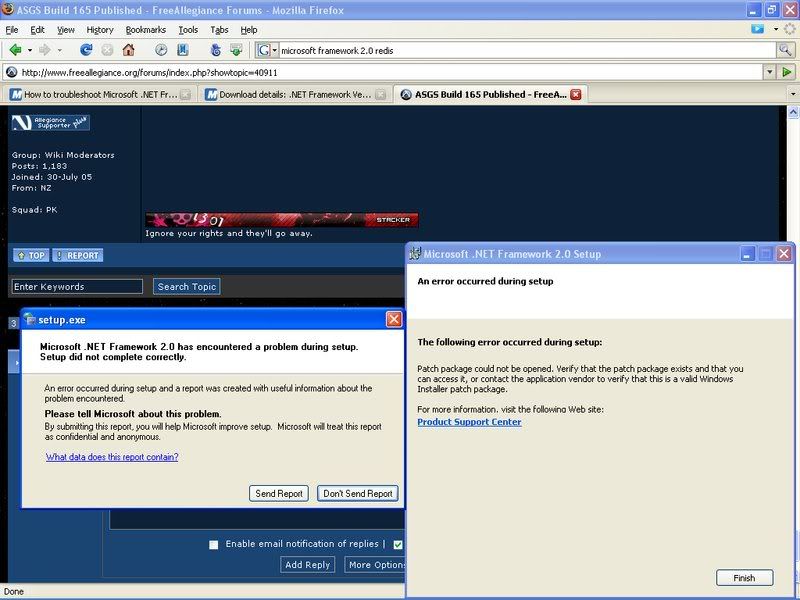
Alright so I clicked on ASGS like normal and it updated, no surprise. Only to find the common GUI problem posted above. So I thought hey I can fix it just reinstall framework or update it. Every framework verion I download is giving me errors that it can't be installed. Some quit while, some stop ahead. I can't repair the files either, as it give me the same thing. Here it is.
Click to enlarge!
Any help would be nice. This is given on every attempt to fix framework.